
Text to Speech Online
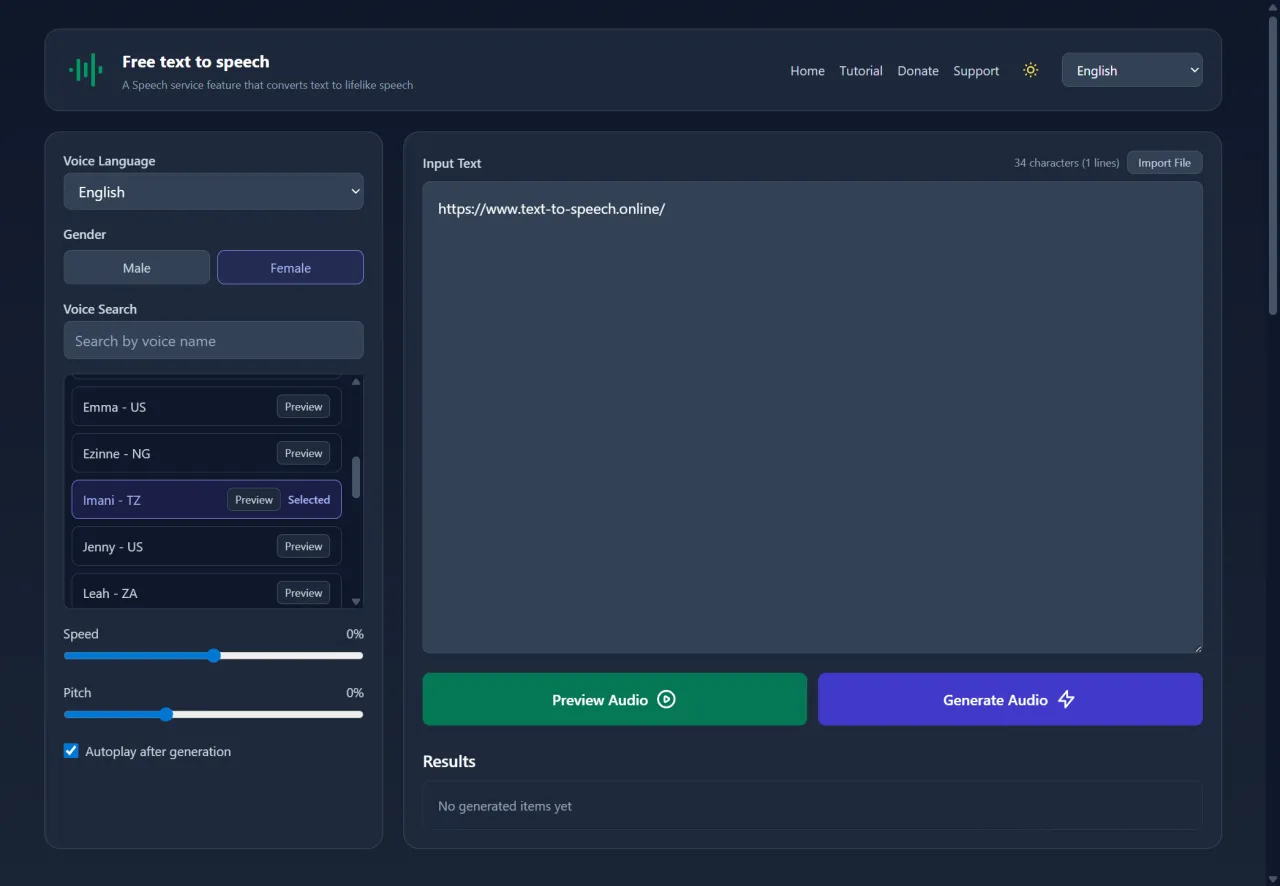
Text to Speech Online is a free browser tool that reads your text aloud with natural AI voices. Paste or import a TXT file, choose from 100+ voices in 27 languages, adjust speed and pitch, preview the result and download it as an MP3. It also offers SRT/VTT subtitle output and Chinese-English mixed reading. No account is needed, which makes it handy for students, language learners and creators who need quick narration.
Is Text to Speech Online right for you?
Best for: Students, language learners, teachers and small creators who need quick, free narration in a browser, such as listening to drafts, practicing pronunciation or voicing short videos. It also suits bilingual users who write mixed Chinese-English text.
Pros
- Completely free, with no account and no daily limits stated
- 100+ voices across 27 languages, including Simplified and Traditional Chinese
- Handles Chinese-English mixed reading in a single passage
- MP3 download plus SRT/VTT subtitle output for video work
- TXT import, speed and pitch controls, and real-time preview
Cons
- The site does not say whether generated audio can be used commercially
- The company behind the tool is not clearly identified on the site
- No voice cloning, voice design or per-word emotion control
- Text is processed online, so it is a poor fit for confidential material
We like how little friction there is: open the page, paste text, pick a voice and download an MP3, all free and without signing up. Our hesitation is about trust and rights, because the site does not name the company running it or say whether the audio is cleared for commercial use. We would use it for study, drafts and personal projects, and check the terms carefully before putting its output into anything paid or published.
About Text to Speech Online
Text to Speech Online is a free website that turns any text you paste into spoken audio you can download as an MP3. It is for moments when you need a voice quickly and don't want to set up an account. You might need a voiceover for a short tutorial, want to hear how a French paragraph should sound, or want to listen to your own draft to catch clumsy sentences.
There's no sign-up. You open the page, type or paste, pick a voice and listen. That simplicity is the main reason to use it, and it sets the tone for the rest of this guide: this is a utility, not a production studio.
What you can do with it
The core job is plain text-to-speech. The site lists more than 100 AI voices across 27 languages, including English, Spanish, French, German, Japanese, Korean, Hindi, Arabic and both Simplified and Traditional Chinese. You choose a language, pick a voice that fits the mood, and the tool reads your text aloud.
Shaping how the voice sounds
You can adjust the speech rate and pitch. That sounds minor, but it matters. A slightly slower rate works well for language practice or instructions. A touch faster suits a punchy social clip. Pitch adjustments help when the default voice sounds too flat or too bright for your content.
Mixed-language text
One feature that stands out is mixed reading of Chinese and English in the same passage. If you write study material, product notes or messages that switch between the two languages, the tool aims to pronounce both parts properly. A single-language voice would usually stumble on the switch.
Previewing, importing and exporting
You get a real-time preview, so you can listen before you download. Longer content doesn't have to be pasted by hand: the site supports importing TXT files for bulk conversion. When you're happy with the result, you download an MP3.
The site also lists subtitle output in SRT and VTT formats, which is useful if the audio is going into a video. Small comforts round it out: dark mode, keyboard shortcuts and a layout that works on a phone browser.
Your first session, step by step
- Open the official website in any modern browser (Chrome, Firefox, Safari or Edge). You don't need to create an account.
- Paste your text into the input area, or import a TXT file if you have a longer script.
- Choose the language first, then browse the voices for that language. Try two or three before you settle.
- Adjust the speed and pitch controls until the delivery feels right for your use.
- Play the preview and listen all the way through. Fix any words that sound off by rewording or adding punctuation.
- Download the MP3. If you need captions, grab the subtitle file as well.
A real example: narrating a short how-to video
Say Maya runs a small craft channel and wants a calm voiceover for a 60-second clip on wrapping a gift with recycled paper. She doesn't want to record her own voice, and she doesn't want to pay for a studio tool just for one clip. She writes the script in a notes app first, keeping sentences short so they're easy to follow on screen.
Start with a sheet of brown paper, a little larger than your box. Fold one long edge over by two centimeters for a clean line. Now wrap the paper around the box, and tape it at the center. Next, fold the ends into neat triangles. Finish with twine, a sprig of rosemary, and a handwritten tag.
She pastes this in, picks an English voice and nudges the speed down slightly so viewers can keep up with her hands. On the first preview, the voice rushes through "two centimeters for a clean line." She adds a comma and a period break, previews again, and it sounds natural.
She downloads the MP3, drops it onto her video timeline, and uses the SRT file as a starting point for on-screen captions. She still checks the caption timing in her editor before she exports.
The whole thing takes about ten minutes. Most of that is spent writing the script, not fighting the tool.
Who else gets value from it
- Language learners can paste vocabulary lists or short dialogues in their target language and listen on repeat, slowing the speed down for tricky phrases.
- Students and writers can hear their essays or drafts read back, which makes awkward phrasing and missing words much easier to catch than rereading silently.
- Teachers can turn reading passages into MP3s for listening exercises and share the files with a class.
- Bilingual Chinese-English users can create audio for mixed-language notes, product descriptions or study cards without splitting the text in two.
- Small creators can make quick placeholder or final narration for short videos, slideshows and explainer clips.
- Anyone who prefers listening can convert a long article or set of notes into audio for a commute, as long as they're comfortable pasting the text into a third-party site.
Tips for better-sounding audio
- Write for the ear. Short sentences and clear punctuation do more for the result than any setting. Commas and periods are your main way to control pauses.
- Spell out tricky items. Numbers, abbreviations, units and brand names can be read oddly. Write "twenty twenty-six" or "kilometers" if the preview gets them wrong.
- Audition several voices. With 100+ options, the first voice is rarely the best match. Test the same sentence across a few before committing to a long script.
- Change speed in small steps. Big jumps make voices sound unnatural. Small adjustments usually land better.
- Split long scripts. Converting a long piece in sections makes it easier to fix one mistake without regenerating everything, and easier to edit in a video timeline.
- Keep your source text. Save the script you used next to the MP3 so you can regenerate a corrected version later.
Limits and things to watch out for
The biggest open question is ownership and rights. The site doesn't say which company is behind it. It also doesn't clearly state whether you may use the generated audio commercially. If you plan to put the audio in a paid course, an ad, a monetized video or anything you publish, check the site's terms first. If they don't settle it, choose a tool with an explicit commercial license.
This is also a simple reader, not a voice studio. There's no voice cloning, no voice design and no fine control over emphasis or emotion on individual words. Your main levers are voice choice, speed, pitch and how you write the text. For character work or brand voices, you'll outgrow it.
Privacy is worth a thought too. Anything you paste is processed online, so avoid sensitive personal, client or confidential material. Finally, always listen to the full preview. AI voices can mispronounce names, foreign words and acronyms, and you'll want to catch that before your audience does.
What it costs
The site presents itself as free, with no registration and no daily limits. That makes it a good fit for occasional users, students and anyone testing an idea before paying for a more capable voice tool. No paid plans are described on the site. If that ever changes, the details will be on the official pricing page. Because the commercial-use terms are unclear, "free" here mostly means free for personal and experimental work until you confirm otherwise.
Alternatives worth a look
If you need studio-grade voices, voice cloning, voice design or dubbing, ElevenLabs is the stronger choice. It is a full audio platform rather than a quick reader. If you want text-to-speech alongside transcription and subtitle tools for audio and video, RecCloud bundles those into one browser workspace. And if the voiceover is part of a bigger edit, Descript lets you work on audio and video through the transcript itself.
Our take
Text to Speech Online does one thing simply: you paste text and get a downloadable voice in seconds, for free and without an account. It's a solid pick for study, drafts and quick narration, and the Chinese-English mixed reading is a nice bonus. Just treat anything commercial with caution until you've confirmed the usage rights. For serious production work, a dedicated voice platform is worth paying for.
Features
Available On
Text to Speech Online FAQ
Is Text to Speech Online free?
Yes. The site describes itself as free forever, with no registration and no daily limits. No paid plans are listed.
Which languages does Text to Speech Online support?
It offers more than 100 AI voices across 27 languages, including English, Spanish, French, German, Japanese, Korean, Hindi, Arabic and both Simplified and Traditional Chinese. It also supports mixed Chinese-English reading.
Can I download the audio and subtitles?
Yes. You can download the speech as an MP3 file, and the site lists subtitle output in SRT and VTT formats for use in videos.
Can I use the audio from Text to Speech Online commercially?
The site does not clearly state whether generated audio may be used commercially. Review its terms of service before using the output in paid, monetized or published projects.
Reviews
Ready to try Text to Speech Online?
Visit the official website to learn more.
Visit Text to Speech Online