
Raphael AI
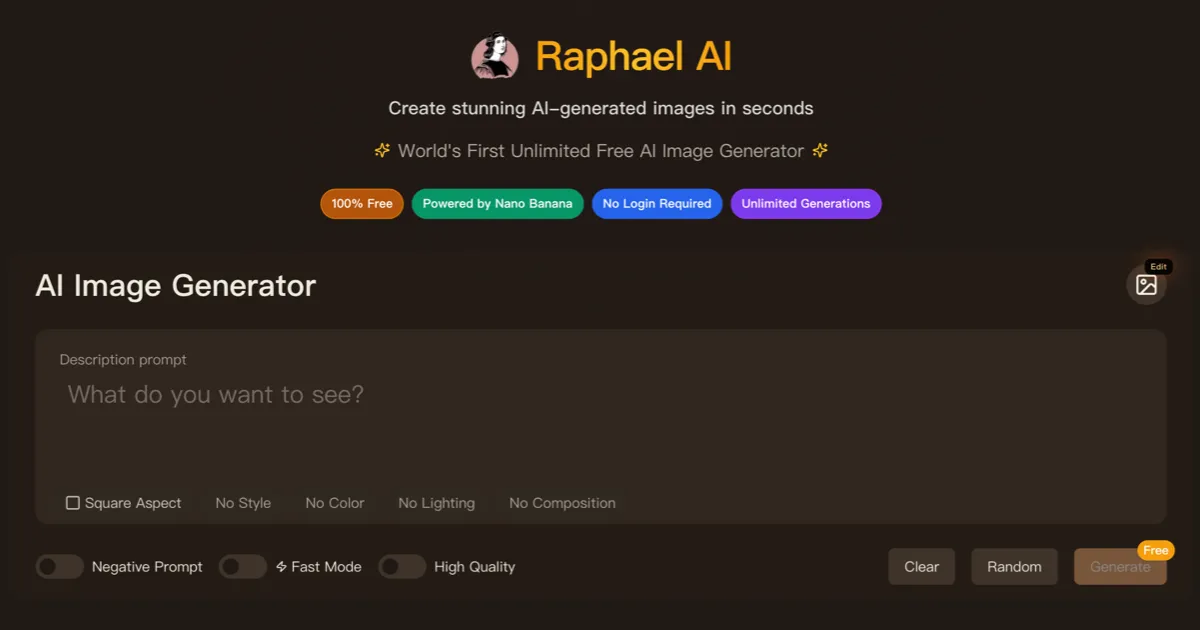
Raphael AI is a browser-based AI image generator that lets you create images from text prompts without signing up. It routes each prompt to a pool of image models, includes editing tools like background removal and upscaling, and adds a free video mode. Paid plans unlock faster queues, watermark-free output and commercial use.
Is Raphael AI right for you?
Best for: Bloggers, marketers, small shop owners and hobbyists who want quick concept images, mockups or social visuals without signing up or paying first. It also fits light editing jobs such as background removal, upscaling and object erasing.
Pros
- Start generating in the browser immediately, with no account or credit card
- Unlimited free generations in basic mode, about 8 seconds per image
- Up to four images per prompt for faster comparison of ideas
- Access to Seedream, Nano Banana, GPT Image and MiniMax models in one place
- Built-in editor covers background removal, upscaling, image expansion and object erasing
Cons
- Free images carry a watermark, and commercial use requires a paid plan
- Free basic mode runs in a queue; priority access and fast generation need credits
- Web-only for now, with dedicated mobile apps listed as planned
- Output varies by model, and the site's FAQs are inconsistent about commercial rights
Raphael AI makes it very easy to try AI image generation: open the site, type a prompt and get results without an account or a payment wall. The free tier is generous for experiments and personal projects. The watermark, the queue and the paid-only commercial license mean client work will push you toward Pro, Ultimate or Max. Compared with Midjourney, it is cheaper to try and more practical thanks to its editing tools, but it does not offer the same consistent, art-directed look. Start here for concepts and everyday visuals, and look elsewhere if a signature style matters more than cost.
About Raphael AI
Raphael AI is a free AI image generator you can open in a browser tab and start using right away, without creating an account. It solves a very specific annoyance: most image generators ask you to sign up, hand over a card, or burn through a credit allowance before you know whether the tool is any good. Here, you type a prompt and get a picture back in seconds. It's aimed at people who need quick visuals — a blog header, a moodboard reference, a product concept — and don't want a subscription just to experiment.
Under the hood, Raphael AI isn't one model but a router. You describe what you want, and the platform picks from a pool of image models (Seedream, Nano Banana, GPT Image and others) to render it. Signed-in users can also pick specific models and higher-resolution options. The same site bundles an image editor, a set of creative utilities and, more recently, a free video mode.
What Raphael AI actually does
The core loop is simple: type a description, choose a model or let the router decide, and generate. The free Basic model returns an image in roughly eight seconds, and you can ask for up to four images per prompt — handy when you want to compare directions before committing to one. The site leans on a "scene-aware" router that tries to match your prompt to the model best suited for it, so a photorealistic portrait and a flat illustration may not go to the same place.
Beyond straight text-to-image, there's an editing side. The image editor handles instruction-based changes, style transfer, expanding an image beyond its original frame, background removal, upscaling and object erasing. There are also narrower tools: an AI watermark remover, an infographics generator, old-photo restoration, a clothes changer and layer separation. These are the kind of one-off jobs people usually stitch together from three different websites, so having them in one place is genuinely convenient.
Model choice is where Raphael AI gets interesting. The lineup includes Seedream variants (3.5 through 5.5), Nano Banana 2 and 2.1, GPT Image 2.5 and 2.6, and MiniMax H3. Some are free, some cost credits, and some are reserved for paid plans. If you care about readable text inside an image or consistent characters across a series, picking the right model matters more than tweaking your prompt endlessly.
Video is the newer addition. The site lists Seedance, Veo and Kling video models, and there's a free video mode with no sign-up that runs on MiniMax H3 Turbo. It's a lighter offering than the image side, but useful for quick motion tests.
Getting started
- Open the official Raphael AI website in any modern browser. No account is needed to begin.
- Type a prompt into the main box. Be specific about subject, lighting, style and framing — "a ceramic coffee mug on a walnut desk, soft morning window light, shallow depth of field" beats "a mug."
- Generate. On the free Basic model you'll wait a few seconds and get your image, usually with a watermark.
- If you want more control, sign in. That unlocks free daily credits, model selection, higher-resolution output up to 2K and a history of your generations.
- Use the editor tools on the left-hand menu when you need to change something rather than start over — expand the frame, erase an object, swap a background.
A real example, start to finish
Say you run a small ceramics shop and need a hero image for a product page. You don't have a photographer booked and the launch is Friday. You open Raphael AI and type:
A handmade speckled stoneware bowl on a pale linen cloth, side angle, soft diffused daylight from the left, muted earthy palette, shallow depth of field, editorial product photography
You generate four variations at once. Two look plasticky, one has odd shadows, and one is close but the background is too busy. You open that one in the editor, use the background removal tool to isolate the bowl, then generate a cleaner backdrop behind it. You upscale the result for the product page and download it. On a paid plan the file comes out without a watermark and you're cleared for commercial use; on the free tier you'd use it for a mockup or internal review instead.
More ways people use it
- Blog and newsletter headers. Generate a consistent set of abstract or photographic images by reusing the same style language in each prompt.
- Moodboards and pitch decks. Produce a dozen rough visual directions in a few minutes before a client call, then refine the one they pick.
- Social content. Make quick vertical visuals for posts, then use the editor to add text or swap backgrounds.
- Restoring family photos. The old-photo restoration tool handles fading and damage without a separate app.
- E-commerce mockups. The clothes changer and background tools let you preview a garment or product in a new setting.
- Storyboarding. Use the video models to turn a still into a short clip and test whether a shot idea works.
Tips for better results
- Name the model when quality matters. If you need legible text in the image, reach for a model known for text rendering rather than the default router.
- Generate four at a time instead of one. Comparing options is faster than re-prompting from scratch.
- Describe the light. "Golden hour," "overcast," "hard flash" changes an image more than most adjectives.
- Use the editor for fixes. Expanding the frame or erasing an object is usually quicker than rewriting the prompt.
- Sign in even if you're just experimenting — free daily credits let you skip the queue and try higher-resolution models.
Limits and things to watch out for
The free tier is genuinely free, but free images carry a watermark, and commercial use is reserved for paid plans. That's the biggest practical catch for anyone using it for client work. The free Basic model also puts you in a queue, which can mean waiting when the site is busy. Content guidelines apply, so this isn't an anything-goes generator.
It's web-only for now — the site says mobile apps are planned, but mobile browser use is the current option. And because the platform routes across many third-party models, output quality varies noticeably between them; a prompt that sings on one model can fall flat on another. Treat model choice as part of your workflow, not an afterthought.
Pricing in plain words
You can use Raphael AI indefinitely without paying: no account, no card, unlimited generations on the basic mode, with a short queue and a watermark. Signing in adds free daily credits and access to higher-resolution models. Paid tiers — Pro, Ultimate and Max — are credit-based monthly plans that add fast generation, priority queues, watermark-free downloads, batch processing, advanced models and commercial-use rights. Exact prices and credit amounts are listed on the official pricing page, and the site frequently runs discounts.
Alternatives worth a look
If you want a polished, art-directed look and don't mind paying for it, Midjourney still sets the bar for stylized imagery. If you need strong in-image text and a clean editor, Ideogram is a solid pick. And if you'd rather work inside a broader creative suite with upscaling and video, Krea bundles a lot into one workspace.
Our take
Raphael AI's best trick is removing friction. No sign-up, no card, no credit anxiety — you can test an idea in under a minute, and the editor tools mean you don't have to leave when the first result isn't quite right. The watermark and commercial-use restriction on the free tier are real limits, so treat it as a try-before-you-buy playground first and a production tool second. For quick concepts and everyday visuals, it's one of the easiest starting points we've come across.
Gallery
Features
Available On
Raphael AI FAQ
Is Raphael AI free?
Yes. The basic mode is free with no sign-up, no credit card and no generation count limit, though images carry a watermark and you may wait in a short queue. Signing in adds free daily credits and access to higher-resolution models of up to 2K.
What do Raphael AI's paid plans add?
The Pro, Ultimate and Max plans are credit-based monthly subscriptions ranging from 2,000 to 10,000 credits per month. They add fast generation, priority queues, watermark-free output, batch processing, access to advanced models and commercial-use rights.
Can I use Raphael AI images commercially?
Commercial use is available on paid plans, subject to the Terms of Service. Free users can use images for personal and other non-commercial purposes and keep ownership of what they generate.
Is Raphael AI available on mobile?
Raphael AI runs on the web at raphael.app and works in mobile browsers. The company says dedicated mobile apps are planned.