
Leonardo Ai
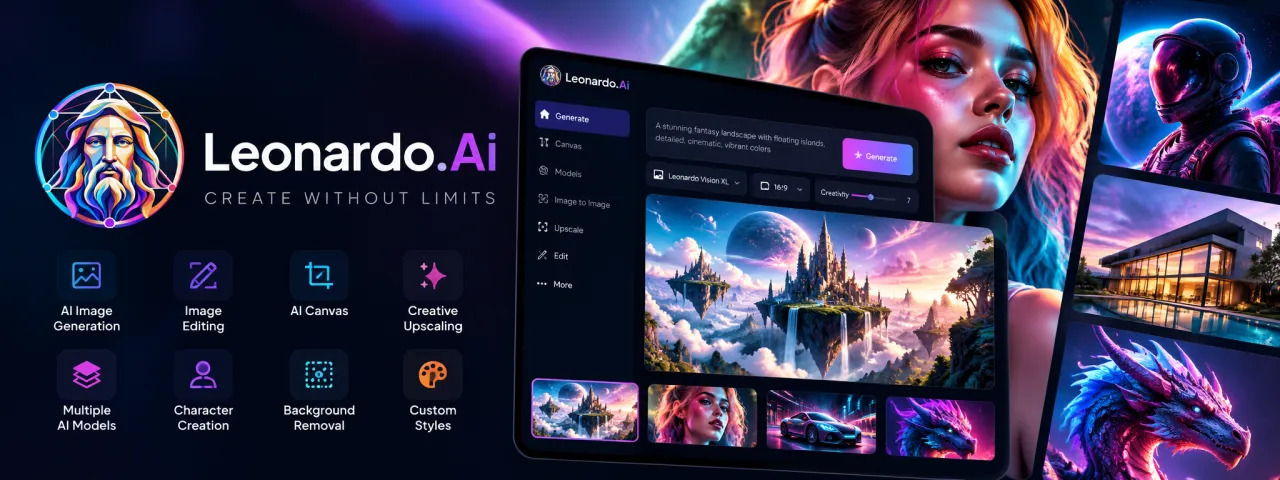
Leonardo.Ai is a browser-based AI image studio for creating images from text prompts, transforming existing pictures, editing, removing backgrounds and upscaling results. It offers many models and style settings, plus a free plan with daily credits. It suits artists, designers, marketers, content creators and game developers who need visual assets quickly.
Is Leonardo Ai right for you?
Best for: Artists, game developers, marketers and content creators who need to explore and finish visual assets quickly, from concept art and character sheets to product shots and campaign imagery, without opening a full design program.
Pros
- Wide choice of models and styles for photorealism, illustration or fantasy art
- Generation, inpainting, canvas extension, background removal and upscaling in one place
- Custom model training keeps a growing asset library visually consistent
- Image references let you steer composition or style beyond text prompts
- Free plan with daily credits allows real testing before paying
Cons
- Users often report that daily free credits run out quickly
- Paid plans can feel expensive for heavy users, since upscaling and video consume more credits
- Prompts and reference images are sometimes misread, so several iterations are common
- Results can vary between runs and may need manual fixes such as hands or faces
Leonardo is one of the more complete browser-based image studios, and its real strength is what happens after generation: editing, extending, upscaling and training a custom style all live in the same workspace. The trade-off is unpredictability and credit consumption, so expect to iterate on prompts and watch your balance closely. Game developers, illustrators and marketers who want more control than a one-box generator should start on the free plan and upgrade only once they know their typical usage.
About Leonardo Ai
Leonardo.Ai is an AI image studio where you type a description, pick a model and a style, and get a batch of images back in seconds. It also gives you tools to edit, extend, upscale and clean up those images afterward. Think of a small game studio that needs fifty concept sketches of a desert village, or a marketer who wants a few on-brand hero images for a landing page before lunch. Leonardo is built for that kind of quick visual exploration.
It sits somewhere between a pure prompt-to-picture generator and a light creative suite. That makes it a good fit for artists, designers, content creators, marketers and game developers who want more control than a one-box generator gives them, without opening a full design program.
How Leonardo turns prompts into usable visuals
Generating images from text
The core of Leonardo is text-to-image generation. You write a prompt, choose from a range of models and visual styles, and set things like aspect ratio and how many images you want per run. For example, you might ask for "a cozy reading nook in a treehouse, warm evening light, watercolor" and get a set of variations to compare side by side. The wide choice of models is a big part of the appeal. One model may suit photorealistic product shots, another may be better for illustration or fantasy art.
Working from images you already have
You are not limited to text. You can upload an image and use it as a starting point or a reference, so the new results borrow its composition or style. This helps when you have a rough sketch, a mood reference or an earlier generation you want to push in a new direction.
Editing, extending and cleaning up
Beyond generation, Leonardo includes editing tools. You can paint over part of an image and describe what should appear there, or extend the canvas beyond its original edges. You can also remove backgrounds to isolate a subject, which is handy for product images, stickers or game sprites.
Upscaling and animating
Once you like a result, you can upscale it to a higher resolution for print or larger screens. Leonardo can also turn a still image into a short animated clip, which is useful for social posts or for previewing a scene with some motion.
Training your own look
For teams that need consistency, Leonardo lets you train a custom model or style on your own set of images. A game developer could train on their existing character art so new generations match the established look, rather than fighting the default style every time.
Your first session in Leonardo
- Create an account on the official website. The free plan gives you daily credits, which is enough to get a feel for the tool.
- Open the image generation tool from the main dashboard. This is where you write prompts and pick models.
- Choose a model and style before you type anything. The model choice affects results more than most beginners expect, so try two or three on the same prompt.
- Set the basics: aspect ratio, number of images and, if you want, a reference image.
- Write a short, specific prompt and generate. Look at the batch, keep what works and refine the prompt for the next round.
- Move your favorite into the editing tools to fix details, remove the background or upscale it before downloading.
A real example: concept art for an indie game
Say you are a solo developer building a cozy farming game and you need a quick visual direction for the main town. You open Leonardo, pick a model that leans toward illustration, set a wide aspect ratio and type:
A small seaside farming town at sunrise, wooden cottages with blue roofs, a market square with fruit stalls, soft pastel colors, hand-painted game concept art, top-down three-quarter view
You get a batch of variations. One has the right layout but the roofs are too dark, and another nails the colors but crowds the square. You pick the one with the best composition, use it as an image reference for the next run, and add "lighter blue roofs, more open space in the square" to the prompt.
After two or three rounds you have a strong candidate. You open it in the editor, paint over an odd-looking stall and ask for a flower cart instead, then upscale the final version. Now you have a concept piece to share with collaborators or use as a style anchor. If the project grows, you could train a custom style on your favorite results so future scenes stay consistent.
More ways to use it
- Social media managers: Generate themed visuals for a campaign, then animate one into a short clip for a post that needs a little motion.
- Online sellers: Remove backgrounds from product photos and create simple lifestyle scenes to test different looks for a listing.
- Illustrators: Use Leonardo as a sketchbook for thumbnails and color studies, then paint the final piece by hand.
- Tabletop game masters: Create character portraits, maps and location art to hand out to players during a session.
- Marketers and agencies: Mock up ad concepts and landing page hero images quickly, so clients can react to visuals instead of written briefs.
- Game developers: Explore character, prop and environment ideas, then train a custom style to keep a growing asset library consistent.
Tips for better results
- Test the same prompt across models. Model choice changes the output dramatically, so compare a few before you rewrite your prompt.
- Describe the subject first, then the style. Start with what is in the scene, then add lighting, medium and mood. Long, cluttered prompts tend to confuse the generator.
- Use reference images when words fail. If you can't describe a composition or color palette, upload an example and let it guide the result.
- Generate small batches while exploring. Credits go faster than you think. Save upscaling and bigger batches for when you're close to the final image.
- Fix details in the editor instead of regenerating everything. Painting over a bad hand or an odd object is usually cheaper and quicker than rolling the dice on a whole new image.
- Keep a note of prompts that work. When you hit a style you like, save the exact prompt and model so you can reproduce it later.
Limits and things to watch out for
Leonardo doesn't always read your prompt or reference image the way you meant it. Specific requests, like exact counts of objects, precise layouts or text inside the image, can take several attempts. Plan for iteration rather than expecting a perfect result on the first try.
Results can also vary from run to run, and some images need manual cleanup, such as odd hands, warped details or inconsistent faces across a series. For anything client-facing, budget time for touch-ups in the built-in editor or another image program.
Credits are the other practical constraint. Upscaling, video and higher-quality settings use more of them, so heavy users can burn through an allowance quickly. Finally, check the current license terms before using generated images commercially, especially on the free plan.
What users say about Leonardo Ai
Many users say Leonardo is easy to pick up, with an interface that feels intuitive even for people new to AI image tools. Image quality and generation speed come up often as strengths. People also like having a wide range of models, styles and settings to choose from. The extra tools, such as editing and upscaling, are frequently mentioned as a reason to stay in one place instead of juggling several apps.
The free plan with daily credits gets credit for letting people try the tool properly before paying. A common complaint, though, is that those daily credits run out quickly. Several users also feel the paid plans get expensive for heavy use.
On the output side, a recurring frustration is that Leonardo sometimes misreads the prompt or reference image. Users report needing several prompt iterations to land the right result, and some note that results can be inconsistent and occasionally need manual fixes.
Pricing in plain words
Leonardo uses a freemium model. The free plan gives you daily credits, which is enough to learn the tool, test models and make occasional images. If you generate regularly, upscale a lot or work with animation, you'll likely outgrow it fast.
Paid plans add more credits and extra capabilities, and they make the most sense for people who use Leonardo every week, such as content creators, designers and small studios. Plan names, prices and credit allowances change over time, so check the current details on the official pricing page before you commit. Try the free tier first to see how many credits your typical project actually uses.
Alternatives worth a look
If your priority is striking, polished artwork from short prompts and you care less about editing tools, Midjourney is a strong option with a distinctive aesthetic. If you already work in Adobe's ecosystem or need clear commercial-use terms for brand work, Adobe Firefly fits more naturally into that workflow. For people who want lots of image, video and 3D models in one browser workspace with real-time feedback, Krea is worth comparing.
Leonardo is also owned by Canva. If your main goal is finished layouts, like social posts, flyers and presentations, rather than raw image generation, Canva may be the better starting point.
Our take
Leonardo is one of the more complete AI image studios for people who want to generate, refine and finish visuals in one place. The model variety and editing tools make it especially good for concept art, game assets and marketing visuals. Expect to iterate on prompts and keep an eye on your credits. Start on the free plan and upgrade only once you know how much you'll actually generate.
Gallery
Features
Available On
Leonardo Ai FAQ
Is Leonardo Ai free?
Leonardo uses a freemium model. The free plan includes daily credits that are enough to learn the tool and make occasional images, while paid plans add more credits and extra capabilities.
What is Leonardo Ai used for?
It is used to generate images from text prompts or reference images, then edit, extend, remove backgrounds and upscale them. Common uses include game concept art, marketing visuals, product images and social media content.
Can Leonardo Ai animate images?
Yes. Leonardo can turn a still image into a short animated clip, which is useful for social posts or previewing a scene with motion. Video features use more credits than standard image generation.
Can I train Leonardo Ai on my own images?
Yes. You can train a custom model or style on your own set of images so new generations match an established look, such as existing character art for a game.