

Goblin
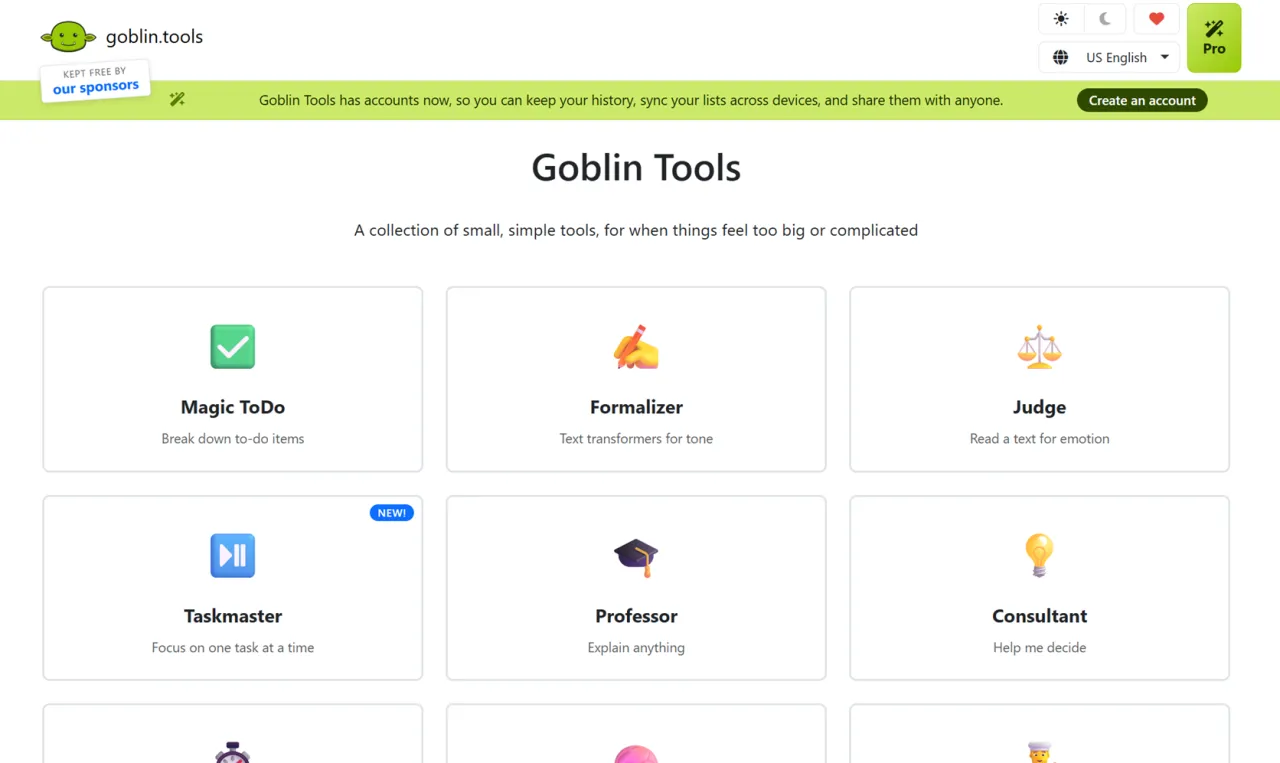
Goblin Tools is a set of small, simple AI helpers for moments when a task feels too big or a message feels too hard to write. Magic ToDo breaks a chore into small steps. Other tools change the tone of a message, judge how it might come across, or estimate how long something will take. It's popular with neurodivergent people and anyone who struggles to get started. It's free on the web, with paid mobile apps.
Is Goblin right for you?
Best for: People who freeze in front of big chores or tricky messages, including many with ADHD or autism, and who want quick help breaking tasks into steps, adjusting a message's tone or estimating time. It works best as a lightweight companion to a regular to-do or calendar app.
Pros
- Magic ToDo splits tasks into steps, with a spiciness dial for detail
- Individual steps can be broken down further without starting over
- Formalizer and Judge help rewrite tone and read how messages land
- Free in the browser with no account and no ads
- Bare-bones, consistent design with almost no learning curve
Cons
- No syncing, reminders or integrations with calendars or to-do apps
- Vague input tends to produce generic steps, as users often report
- Mobile apps for iOS and Android cost a small fee, unlike the website
- Very basic feature set compared with full productivity apps
Goblin Tools earns its place by doing very little, very well: it takes a task or message that feels too big and makes it smaller, with no setup and no account. The trade-off is that it won't track anything for you, so you still need a proper planner for reminders and long-running projects. If getting started is your real bottleneck, the free web version is worth opening the next time you're stuck.
About Goblin
Goblin Tools is a collection of tiny, single-purpose AI helpers for the moments when your brain says "this is too much." You type something messy, like a chore you keep avoiding, an email you're nervous about or a pile of thoughts, and you get back something smaller and clearer. There's no dashboard to learn and no project setup.
Picture a Sunday afternoon and the note on the fridge that just says "clean the kitchen." That note isn't helping you. Goblin turns it into a short list of steps, starting with something like "clear the counter by the sink." It's widely used by people with ADHD or autism and by anyone with executive-function struggles. It also helps anyone who has stared at a task long enough to feel stuck.
The small tools inside the Goblin toolbox
Goblin isn't one app with many menus. It's a row of separate mini tools, each doing one job. You pick the one that matches your problem, type, and press a button. They share the same calm, bare-bones look, so once you've used one, you know how to use them all.
Magic ToDo: making big tasks small
This is the tool most people come for. You enter a task and it splits it into concrete steps. A "spiciness" setting controls how fine-grained the breakdown gets. On a low setting, "do my taxes" becomes a handful of stages. Turn it up and you get tiny actions, like "find last year's return" and "open the folder with receipts." You can also break any single step down further. That helps when one step still feels like a wall.
Formalizer: changing the tone of what you wrote
Paste in a message and ask Goblin to rewrite it in a different register: more formal, more casual, more polite and so on. It's handy when you know what you want to say but not how to say it to your boss, your landlord or a new acquaintance. For example, a blunt "I can't make Friday, move it?" can come out as a courteous request to reschedule.
Judge: checking how a message might land
Judge works the other way. Paste a message you received or one you're about to send, and it tells you how the tone might be read. Some people use it to decode an ambiguous text from a coworker. Others use it to check that their own reply doesn't sound colder than they meant.
Estimator, Compiler and Chef
Estimator guesses how long a task will take, which helps if time tends to slip away from you. Compiler takes a brain dump and sorts it into a tidy list of actionable items. Chef suggests a recipe based on the ingredients and constraints you give it. Each is simple on its own. Together they cover a lot of small daily friction.
Your first ten minutes with Goblin
- Open the official website. You can start right away in the browser, no account needed.
- Choose Magic ToDo from the list of tools and type one task that has been bothering you.
- Set the spiciness level. Start low and only raise it if the steps still feel too big.
- Press the button to break the task down, then tick off steps as you go. Use the option on an individual step to split it further.
- Switch to Formalizer or Judge from the same menu when you hit a message you're unsure about.
- If you'd like Goblin on your phone, look for the mobile apps linked on the site. They're paid, unlike the free web version.
One stuck afternoon, start to finish
Say you're a freelance designer who has been putting off one dreaded job for a week: sending an invoice reminder to a client who is two months late. The task isn't hard. It's the dread that's stopping you.
First, open Magic ToDo and type:
Chase the overdue invoice from my client and make sure I get paid
With a medium spiciness setting, you get a short list. Find the original invoice and due date. Check whether any payment arrived. Write a reminder email. Decide on a follow-up date. Note the next step if there's still no reply. Suddenly the first move is just "find the invoice," which takes two minutes.
Next comes the email. You write a rough, slightly annoyed draft and paste it into Judge to see how it reads. If it comes back as tense or accusatory, you move to Formalizer and ask for a more polite, professional version. You read it, change a detail or two so it sounds like you, and send it. Finally, you add "check for reply" to your regular calendar, since Goblin doesn't connect to other apps.
The whole thing takes maybe fifteen minutes. Most of the value comes from lowering the barrier to starting, not from clever AI.
More ways people use it
- Students with a big assignment: Break "write the history essay" into research, outline and drafting steps, then use Estimator to see how much time each one needs.
- Parents planning a busy week: Dump every errand and appointment into Compiler and get back a cleaner list to work through.
- People who find social tone confusing: Run an unclear text or email through Judge before reacting, so a neutral message isn't misread as an angry one.
- Anyone writing to officials: Use Formalizer to turn a frustrated note to a utility company or school into something calm and clear.
- Cooks staring at a half-empty fridge: Give Chef what you have on hand and get a simple recipe idea instead of ordering takeout again.
- Coaches, therapists and teachers: Show clients or students how to break down tasks themselves, using Magic ToDo as a visual example.
Getting better results from the goblins
- Be specific in your input. "Clean the garage so the car fits" gives far better steps than just "garage." Vague input tends to produce generic output.
- Add context to messages. In Formalizer or Judge, include who the message is for. A note to a friend and a note to HR need very different handling.
- Use spiciness as a dial, not a fixed setting. On good days a low level is enough. On foggy days, crank it up until the first step feels almost silly.
- Re-break the scary step. If one item in a list still feels heavy, split just that item instead of starting over.
- Treat estimates as a sanity check. Estimator's times are a rough guide. Use them to notice when you've packed too much into one day, not as exact numbers.
- Always reread rewritten messages. Formalizer can overshoot the tone. Adjust a phrase or two so the message still sounds like you.
Where Goblin falls short
Goblin is intentionally minimal, and that cuts both ways. There's no syncing with calendars or other to-do apps, no reminders, no shared lists and no projects. If you need a system that tracks everything over weeks, Goblin works best as a quick helper next to your main app.
The output is only as good as what you type in. Short or ambiguous tasks can produce bland, one-size-fits-all steps. Like any AI tool, it can also suggest steps that don't fit your situation, so treat its lists as a draft. Finally, don't paste sensitive personal or work information into any AI tool unless you're comfortable with that.
What users say about Goblin
Many users say Magic ToDo is the reason they keep coming back. Turning an overwhelming chore into small, adjustable steps is the most praised feature by far. People with ADHD or autism often describe it as a real help with getting started, and others who simply procrastinate say the same. The calm design and lack of a learning curve come up again and again.
Users also like the supporting tools. Formalizer gets credit for fixing the tone of messages, Judge for reading how something sounds, and Estimator for time planning. The free web version, with no account and no ads, is a frequent point of praise.
On the other side, a common complaint is that the interface and features feel very basic next to full productivity apps. Some users note that answers get generic when the input is vague. Others miss syncing or integrations with their to-do and calendar apps. A few are surprised that the mobile apps cost a small fee when the website is free.
What it costs
The core tools are free to use in a web browser, with no sign-up required. That's enough for most people who want to try it or use it now and then. The mobile apps for iOS and Android cost a small fee. They make sense if you rely on Goblin daily and want it in your pocket. There's also a Goblin Tools Pro sign-in on the site. Check the official site for current details on what Pro includes and what it costs.
Other tools to consider
If you want an assistant that can do much more than break down tasks, ChatGPT can handle task planning, rewriting and tone checks in one place. You'll need to write fuller prompts yourself, though. If your real need is a lasting system with projects, reminders and shared work, ClickUp or Notion AI fit better, at the cost of more setup. For tone and clarity in everyday writing, Grammarly works right where you type. That's more convenient than copying text into Formalizer.
Our take
Goblin Tools succeeds because it does so little. When a task or message feels too big, it shrinks it, quickly and kindly, without asking you to learn a system. It won't replace a real planner, and it's not meant to. As a free first aid kit for getting unstuck, it's one of the easiest AI tools to recommend.
Features
Available On
Goblin FAQ
Is Goblin Tools free?
Yes, the core tools are free to use in a web browser with no sign-up and no ads. The mobile apps for iOS and Android cost a small fee, and there is also a Goblin Tools Pro sign-in on the site.
What is Goblin Tools used for?
It is a set of small AI helpers for everyday friction. Magic ToDo breaks tasks into steps, Formalizer rewrites a message's tone, Judge checks how a message might come across, Estimator guesses how long a task will take, Compiler turns a brain dump into a task list and Chef suggests recipes.
Does Goblin Tools sync with my calendar or to-do app?
No. Goblin Tools has no syncing or integrations with other apps, so you need to copy any steps or follow-ups into your own calendar or task manager.
What platforms does Goblin Tools support?
It runs in any web browser, and there are paid mobile apps for iOS and Android.