

AI Rap Video
AI Rap Video turns one clear photo of one person into a short vertical rap video: you pick a stage like Desk concert, Birthday or Viking, and a few minutes later you get a 9:16 MP4 with an original song and lyrics. No subscription, no free trial — credits are bought in one-time packs.
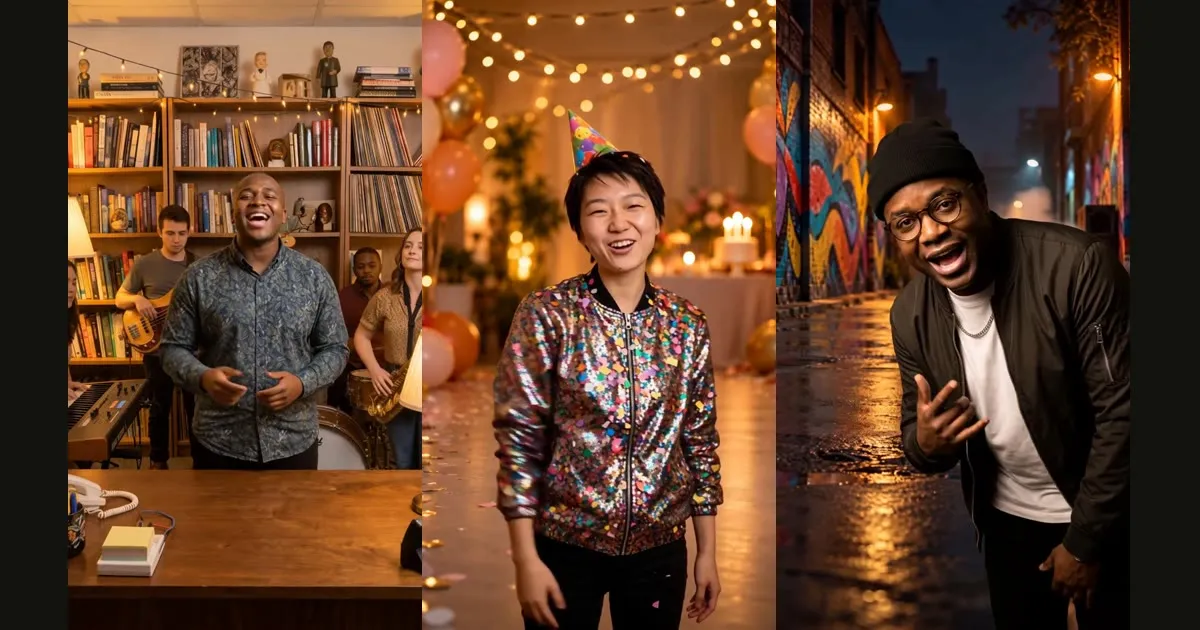
Is AI Rap Video right for you?
Best for: Friends, coworkers and social creators who want a quick, shareable rap clip of a real person for birthdays, roasts, holiday greetings or the tiny-desk meme. It suits people with a single photo and no video skills, not anyone doing professional music or video production.
Pros
- One clear selfie is all you need; no prompts, timeline or editing
- Vertical 9:16 MP4 with sound and no watermark, ready for feeds
- Nine themed stages, including Desk concert, Birthday, Christmas and Viking
- One-time credit packs, no subscription, and failed generations cost nothing
- Per-video price drops from $4.99 to $2.00 on larger packs
Cons
- No free trial, so you pay before seeing a result with your own photo
- Lyrics and songs are fixed per stage; you can't write your own yet
- Clips are short: 10 seconds on most stages, 15 on two
- Strict photo rules: one clearly visible face, and only yourself or a consenting adult
AI Rap Video does one thing and keeps it simple: you upload one photo and get a short, shareable rap clip a few minutes later, with no settings to learn. The trade-off is control. The songs are fixed, the clips are short, and you pay before seeing your first result. Still, at $4.99 for a single video it's a cheap way to test a birthday surprise or group-chat roast, and frequent posters will get better value from the larger packs.
About AI Rap Video
AI Rap Video is a browser tool that takes a single photo of a single person and turns it into a short rap performance. You upload a selfie, choose a scene, and a few minutes later you have a vertical video with sound where the person in the photo sings an original song inside that scene. It solves a very specific, very modern problem: you want to post the desk-concert meme or send a birthday roast, but you have no band, no studio and no video skills.
It is built for people who make things for group chats and social feeds — friends, coworkers, creators posting daily — rather than for professional video production. If that sounds like you, the appeal is how little you have to bring: one photo, one choice, done.
What you actually get, stage by stage
The core idea is the stage. Each stage is a fixed scene with its own original song and lyrics, and the singing voice follows the face in your photo. You are not writing prompts or lyrics; you are casting a person into a ready-made performance.
The two longest stages run 15 seconds. Desk concert is the tiny-desk meme: your subject sings lead in front of a small band and a wall of bookshelves. Shared-mic duet puts two people against a turquoise wall with a hanging microphone, so you add a friend and they trade verses. Everything else runs 10 seconds: Birthday with string lights and a party hat, Night street with wet pavement and graffiti, Christmas with a Santa hat and fireplace, Elf dance with two backup elves, plus Orange studio, Day job behind a cafe counter, and Viking in a torch-lit great hall.
The output is consistent: an MP4 at 768 × 1344 pixels, 9:16 vertical, with sound and no watermark. You download it from the result page and keep it. Generation usually takes 5 to 8 minutes, and the finished video stays on the page so you can come back to it later.
Under the hood it is a two-step pipeline — an image model places the person into the stage, then a video model (MiniMax H3, per the site) generates the performance, song and sound together. You never touch those settings, which is the point.
How to get started
- Create an account and buy a credit pack. There is no free trial, so the smallest pack ($4.99 for 10 credits) is your first video.
- Pick a stage from the wall of examples, or press "Make this" on any clip you like the look of.
- Upload one photo: one person, face clear and facing roughly the camera, no sunglasses or hands over the mouth, even lighting. A plain selfie works; a half-body shot gives Desk concert more to work with.
- Confirm the credit cost shown before generation, then start it. A failed generation costs nothing.
- Wait 5 to 8 minutes, then play the result and download the MP4.
One video from start to finish
Say a coworker's birthday is on Friday and the team chat needs something better than a cake emoji. You find a decent photo of her from the last offsite — she agreed to it, she is alone in the frame, and her face is clear — and you open the Birthday stage.
Upload: one half-body photo, face visible, no microphone needed.
Stage: Birthday (10s, 9:16).
Cost shown: 10 credits.
Seven minutes later you have a 10-second vertical clip where she performs a birthday rap in a room with string lights and balloons. You download the MP4, drop it in the group chat before the cake comes out, and keep the credits you have left for the next occasion. If the first result looks off — usually because the photo was blurry or the face was turned — you fix the photo and try again rather than fighting with settings.
More ways people use it
- Group-chat gifting: give every friend their own headline set. A 20-video pack covers a whole group chat.
- Roasts and inside jokes: the Viking hall or the cafe counter do the teasing for you, which lands better than a written joke.
- Trend memes: the desk concert is the meme everyone is already posting, and the output is already 9:16 for Reels, TikTok and Shorts.
- Seasonal cards: Christmas and Elf dance make a video greeting that raps, including the family if you add extra photos to the elf scene.
- Daily posting: creators who publish every day can work through stages and reuse the same face across a series.
Tips for better results
- Spend a minute on the photo. Crop out friends, pets and posters with faces — the stage casts exactly one performer.
- Skip sunglasses, masks and anything covering the mouth; the face check will reject them.
- Use a half-body shot for Desk concert, where there is more scene to fill.
- Buy the bigger pack only after your first video lands. The per-video price drops from $4.99 to $2.00 at the top pack, but credits are only worth it if you will use them.
- If a generation times out, check the existing video before starting another — a connection timeout does not always mean failure.
Limits worth knowing
The biggest one: you cannot write your own lyrics yet. Each stage comes with a fixed original song, so the creative choice is the scene, not the words. Videos are short — 10 seconds on most stages, 15 on two — which is fine for feeds but not for anything longer-form.
There is also no free trial, so you pay before you see your own result. And the rules are strict about whose photo you upload: only yourself or an adult who has clearly agreed. Photos of children or celebrities are not allowed, and every photo and finished video goes through a safety check. If a video is withheld, you are not charged.
Pricing in plain words
Every video costs 10 credits, whatever the stage, and you buy credits in one-time packs through Stripe. The entry pack is $4.99 for one video; packs scale up to $199.99 for 100 videos, bringing the per-video price down to $2.00. There is no subscription and no auto-renewal, credits do not expire while your account is active, and unused credits can be refunded within 7 days of purchase. If you only want one gag video, buy the smallest pack; if you are posting daily, the larger packs are where the value is.
Alternatives worth a look
If you want the same photo-to-rap trick with a different set of viral trends, Rap Blaze is the closest match. If your real goal is a talking, lip-synced presenter rather than a song, HeyGen gives you avatars and scripted video instead. And if you would rather generate the music yourself and cut the video around it, Suno handles the song side while a normal editor handles the rest.
Our take
AI Rap Video is a narrow tool, and that is its strength: one photo in, one shareable clip out, with no timeline and no prompt engineering. The lack of a free trial and the fixed lyrics are real drawbacks, but at $4.99 for a first video it is a cheap way to find out whether the joke lands with your people.
Features
Available On
AI Rap Video FAQ
Is AI Rap Video free?
No. There is no free trial or free video. The smallest pack costs $4.99 for 10 credits, which covers one video, and a failed generation doesn't use any credits.
How much does an AI Rap Video cost?
Every video costs 10 credits, whatever the stage. One-time packs range from $4.99 for one video to $199.99 for 100 videos, about $2.00 each. There is no subscription, and unused credits can be refunded within 7 days of purchase.
What do I get and how long does it take?
You get a vertical 9:16 MP4 at 768 x 1344 pixels with sound and no watermark. It runs 15 seconds on the Desk concert and Shared-mic duet stages and 10 seconds on the others, and it's usually ready in 5 to 8 minutes.
Can I write my own lyrics?
Not yet. Each stage comes with its own fixed original song and lyrics, and the singing voice follows the person in your photo.